Ar Crusader redaktors: Nokļūšana Crusader has introduced a whole new way of playing Stronghold: The Skirmish. Crusader ir ieviesusi pilnīgi jaunu veidu spēļu Stronghold: The Skirmish. This is a combination of Multiplayer and Seige map, rolled into one, and presented with a nice bow on top. Tas ir kombinācija, kas piedalās vairāki, un Siege karte, velmētas vienā, un aprīkots ar jauku priekšgala uz augšu. What it has done, though, is replaced both of the previous options that were available when building a map. Kas tas ir darīts, lai gan, aizstāj abi iepriekšējā iespējas, kas bija pieejami, kad ēku karti. (Another, Seige This!, is more or less just gone). (Citu, Siege Tas!, Ir vairāk vai mazāk tikai aizgāja).
In essence, a Skirmish is a Multiplayer map masquerading under a new name. Būtībā, a Skirmish ir vairāki karte masquerading ar jaunu nosaukumu. You can still play it with your friends online, but now you can also play it offline against computer opponenets (that's where the seige aspect comes in). Jūs tomēr varat atskaņot to ar draugiem tiešsaistē, bet tagad jums var arī atskaņot to bezsaistes pret datoru opponenets (tas ir, kad aplenkuma aspekts ir saistīts). Because of this new gameplay option, there have been some changes in how you get to your blank map to start designing. Sakarā ar šo jauno gameplay iespēju, ir dažas izmaiņas, kā jums ar savu tukšo karti, lai sāktu projektēšana.
First step finds you at the main menu, and looking for the link to the Map Editor. Pirmais solis konstatē, jūs galveno izvēlni, un meklē saiti uz karte redaktora. The button has been renamed in Crusader to read "Custom Scenarios." Šī poga ir pārdēvēta un Crusader, lai izlasītu Custom Scenarios. "
From there you will see the following choices: No turienes jūs redzētu pēc izvēles:
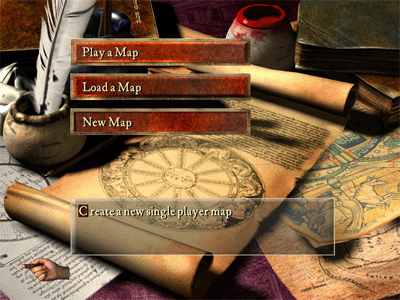
1) ir svarīga karte - Šī iespēja ļauj spēlēt muitas scenāriju. Custom skirmish and castle builder maps are available from their appropriate links on the main menu. Pielāgotās skirmish un sapņotājs kartes ir pieejamas no to atbilstošu saites galveno izvēlni.
2) Load a Map -- Open a map into the map editor to make changes. 2) kravas karti - Open karti uz kartes redaktoru, lai veiktu izmaiņas.
3) New Map -- Create a new map. 3) Jauni karte - izveidot jaunu karti. For the sake of argument, let us follow the choices from this button, as the other two are self explanitory. Par Teorētiski mūs sekot izvēli no šo pogu, kā pārējās divas pašapkalpošanās explanitory.
When you click on New Map, you will be presented with three more choices: Kad jūs noklikšķināt uz jaunu karti, jums tiks aprīkots ar vēl trīs izvēles:
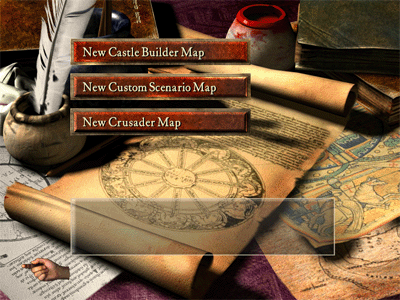
1) Jaunas fantasts karte - Tas ļaus jums izveidot fantasts karte, kas ir paredzēta kā vienu dalībnieku spēle bez reālas mērķiem, kas nav veidot, un nav notikumu (kā lietotājs var izveidot savu ar atsišanos ar F1 taustiņu). When you click this, you will be given your choice of map size, and from there you can start designing your terrain. Kad jūs noklikšķiniet uz šo, jums tiks dota Jūsu izvēles karte izmērs, un no šejienes varat sākt projektēšana jūsu reljefu.
2) New Custom Scenario Map -- This will allow you to create either an invasion or economic scenario similar to Stronghold. 2) Jaunās Custom scenārijs karte - Tas ļaus jums izveidot vai nu iebrukuma vai ekonomikas scenārijs līdzīga Stronghold. In fact, almost identical to Stronghold. Patiesībā, gandrīz identisks Stronghold. What this means is that you may put down an enemy castle in this map, but it will not be controlled by an AI. Ko tas nozīmē, ka jums var nolikt ienaidnieks pils šajā karti, bet tas nebūs, ko kontrolē AI. When you click on this button, you will first be prompted for the size of the map, and then taken to the map editor page. Kad jūs noklikšķināt uz šīs pogas, jūs pirmo reizi uzvedne par lielumu, uz kartes, un pēc tam veikti, lai kartes redaktoru lapā. There are two new buttons at the bottom of this page that look like the following: Ir divas jaunas pogas no apakšas uz šo lapu, kas izskatās šādi:
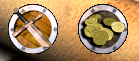
Pogu pa kreisi nozīmē, par invāziju scenārijs, un viens par tiesībām Ekonomikas scenāriju. This is only intended as an identifier in Crusader, whereas in Stronghold the two types were available from different menus. Tas ir domāts tikai kā identifikatoru Crusader, bet Stronghold divu veidu bija pieejama no dažādām izvēlnēs.
3) New Crusader Map -- This allows you to build a new Skirmish/Multiplayer map. 3) Jauni Crusader karte - Tas ļauj jums izveidot jaunu Skirmish / vairāki karti. These are maps that can be played online and/or against the new computer AI that are bundled with the software. Tie ir kartes, kas var būt tiešsaistē un / vai pret jaunu datoru, AI, kas ir saistīta ar programmatūru. When you click this button, you will be presented with an option of map sizes, and then will be taken to the map editor screen. Kad jūs noklikšķiniet uz šīs pogas, jums tiks prezentēti ar iespēju karte izmērus, un pēc tam tiks veikti, lai kartes redaktoru ekrānu. Where the Scenario Map had indicators for Economic and Invasion, the Skirmish editor has these two buttons: Ja scenārijs karte bija rādītājus Ekonomikas un Invasion, tad Skirmish redaktors ir šīs divas pogas:

Tie paredz projektētāji norādīt, vai viņš vai viņa uzskata, karti, lai būtu līdzsvarots vai sabalansēta. This is just an indication to the player as to whether teams or individuals are on equal footing on the map, or there is either a size or a numbers advantage intended. Šis ir tikai norādi uz spēlētāju par to, vai grupas, vai personu, tādu pašu kā uz kartes, vai ir vai nu izmēru vai numurus priekšrocības paredzēta.
You are now able to get into the editor, and select which type of map you want to make. Jūs tagad var nokļūt redaktoru, un izvēlieties, kāda veida karti Jūs vēlaties veikt. From here, let's proceed to what has changed or moved in this editor. No šejienes, pieņemsim, doties uz to, kas ir mainījies, vai pārvietot šo redaktoru.
Oficiālais raksts: Links